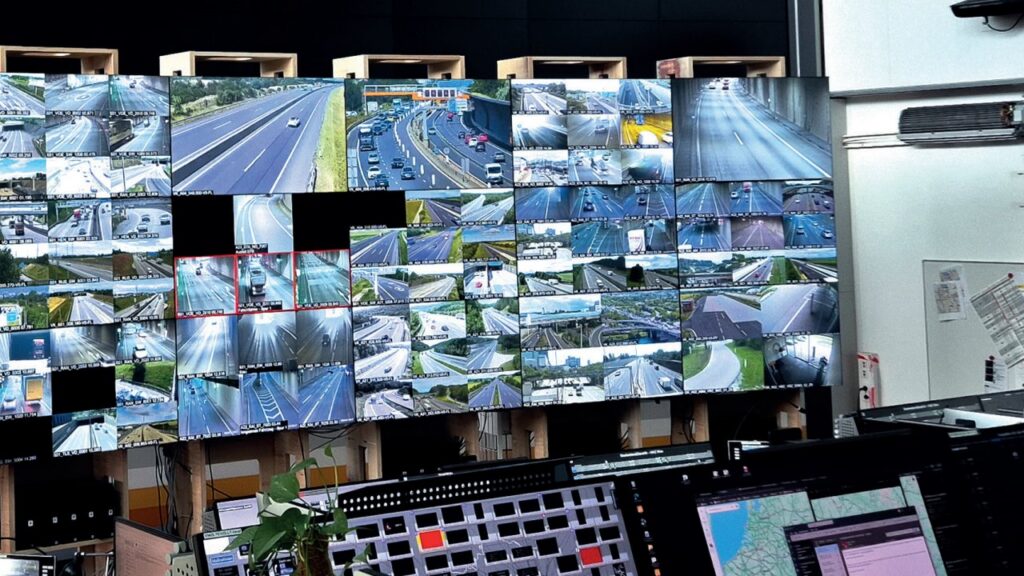
A control room or command center rarely fails from one day to the next — the need to act builds up gradually. Spare parts become harder to obtain, individual monitors show signs of aging, software versions reach end of life, or additional sources can only be integrated with great effort. At the same time, the requirements for availability, IT and OT security, ergonomics and documentation keep rising.
Anyone who wants to modernize a control room or modernize a control center must therefore think beyond replacing individual devices. What is decisive is how operation continues safely during the rebuild, which existing components can be kept, and how video wall, KVM, workspaces, space and service will work together in future.
controlrooms accompanies this process as a single-source integrator: from as-is analysis and planning through the rebuild and migration concept to the fallback control room, integration, switchover and ongoing maintenance. Depending on the existing installation and criticality, implementation can take place during live operation, via a temporary backup control room, or by building a new control room in parallel.
When should a control room or command center be modernized?
The age of the installation alone is not the only criterion. More important is whether the control room reliably fulfills its task today and in the coming years. Typical warning signs are:
- central components reach end of life or end of service;
- spare parts, updates or qualified support are no longer assured;
- faults and unplanned service call-outs increase;
- additional systems, sources or workspaces are hard to integrate;
- image quality, display surface or response times are no longer sufficient;
- KVM access and user permissions are confusing or technically outdated;
- redundancies are missing or were never tested under realistic conditions;
- cable routes, cooling and maintenance access make safe service difficult;
- light, acoustics, sight lines or furniture strain operators in 24/7 operation;
- documentation and the actual system status no longer match.
At the latest when several of these points coincide, you should no longer only react to the next defect. A structured as-is analysis creates the basis for a plannable investment and migration path.
Why replacing individual components is often not enough
A video wall, a KVM system or a control room desk never works on its own. The image content determines viewing distances and resolution. The number of sources influences the KVM and controller architecture. New hardware changes heat generation, power supply, network and service access. A different operating concept, in turn, can affect furniture, monitor arrangement and workflows.
That is why resilient control room planning considers the entire operating process. This includes operator tasks, alarm paths, shift operation, sight lines, ergonomics, large-format display, KVM, control, lighting, acoustics, climate, cable management, IT/OT interfaces, redundancy and maintenance.
An isolated device swap can solve a problem in the short term, but at the same time create new interface risks. A documented target architecture prevents the modernized control room from hitting technical or spatial limits again after just a few years.
Modernizing a control room: three paths to the goal
Not every modernization needs the same process. In practice, three basic scenarios come into question.
1. Rebuild in the existing control room
Individual tasks are carried out in coordinated phases. Systems can be prepared and tested in advance and then switched over in defined time windows. This approach is suitable when the existing installation offers enough redundancy and installation work does not unreasonably affect operation.
2. Temporary backup control room or fallback control center
If the existing room cannot be used safely during the rebuild, a functional transitional environment is set up. Operators work temporarily in the backup control room while the actual control room is renewed technically and spatially.
3. Build a new control room in parallel
If suitable space is available, a new control room can be fully built in parallel with the existing one. Technology, workspaces and operating processes are integrated and tested while the old control room keeps working. Only after approval does the controlled migration take place.
Which variant makes sense depends on criticality, space, system condition, redundancy, project time and acceptable risk. A blanket promise of “no interruption at all” would be dishonest. With a suitable transition concept, however, a modernization is often possible without operational interruption or with tightly limited switchover windows planned well in advance.
A backup control room is more than a stopgap
A backup control room only fulfills its purpose if operators can reliably carry out their decisive tasks there. A few extra monitors in an adjacent room are not enough for this.
controlrooms plans the transitional environment as part of the overall rebuild concept. Among other things, the following are defined:
- the necessary operator workspaces and functions;
- visualization of the prioritized situational and process images;
- access to computers and sources via the KVM system;
- user permissions, signal paths and communication tools;
- network, power supply and required redundancies;
- minimum ergonomic requirements for the intended usage period;
- test cases, acceptance criteria and documented fallback options.
Before operators move, the backup control room is tested under conditions as realistic as possible. Only when the agreed core functions are demonstrably available does the rebuild in the main room begin. The return to the modernized control room also does not happen spontaneously, but after a function test, acceptance, training and an approved switchover plan.
How controlrooms approaches a modernization
1. Record the existing installation and understand the operator
At the start, rooms, systems, sources, workspaces, interfaces and documentation are recorded. Conversations with operators, IT, OT, maintenance and operations managers show which processes work and where risks or unnecessary strain arise in everyday life.
2. Assess risks and dependencies
Which components are critical? Where are spare parts missing? Which systems depend on each other? Which failure paths and redundancies actually exist? This analysis produces a prioritized risk list.
3. Develop a target picture and variants
controlrooms develops a technical and spatial target picture. Variants show which components should be reused, modernized step by step or completely replaced. This makes investments, benefits and project risks traceable.
4. Plan space, sight lines and ergonomics
A 24/7 control room must work for people. Desk geometry, monitor positions, viewing angles, walkways, lighting, acoustics and climate are matched to tasks and shift operation. Relevant standards and planning principles, including the ISO 11064 series, are taken into account on a project-specific basis where applicable. 3D planning and visualization help to review decisions before implementation.
5. Define the technical architecture
Now video wall and large-format display, controllers, KVM system, control, networks, interfaces, permissions and redundancy are planned as a coherent architecture. This includes capacity reserves as well as safe maintenance and expansion paths.
6. Plan transition and migration
The migration concept describes every operationally relevant phase: preparations, parallel build, backup control room, tests, responsibilities, switchover criteria, time windows and fallback plan. This way everyone involved knows what happens when and which decision releases the next step.
7. Integrate, test and switch over
Systems are pre-configured and tested as far as possible. This is followed by mounting, integration, function tests, trial operation, training and acceptance. The switchover takes place only when the agreed criteria are met.
8. Document and secure the lifecycle
Up-to-date plans, configurations, permissions, component lists and service information form the basis for stable operation. A coordinated maintenance and service concept supports spare-parts provision, updates, regular inspection and later expansion.
Which areas can be modernized?
A control room modernization can cover the entire room or specifically defined areas:
- video wall, displays, projection modules and large-format controllers;
- KVM matrix or KVM-over-IP, including the user and permission concept;
- central control, for example with Barco CTRL;
- operator workspaces, control room furniture, monitor mounts and cable management;
- technical racks, signal distribution, network and interfaces;
- power supply, redundancy, cooling and ventilation;
- lighting, acoustics, privacy and room design;
- documentation, maintenance access and service processes.
Replacing the KVM system in a controlled way
When replacing an existing KVM system, it is not only the number of inputs and outputs that matters. Before migration, computer sources, resolutions, USB functions, latency requirements, user groups, permissions and critical operating paths are recorded.
The new KVM architecture is prepared in parallel as far as technically possible. Test workspaces check image, keyboard, mouse, USB functions and access rights. Only then are sources and operator workstations migrated according to a defined procedure. For critical steps, a defined fallback option remains available. This turns a risky device swap into a controlled system change.
Not everything has to be new
A serious modernization does not start with a complete shopping list. Components worth keeping can continue to be used if condition, interfaces, security, performance and expected remaining service life fit the target system.
This can affect, for example, racks, cabling, computers, furniture parts, displays or signal paths. What is important is a technical assessment rather than a mere assumption. Reused components are documented and incorporated into the future service and lifecycle concept. This way the operator protects sensible investments without carrying unrecognized legacy issues into the new architecture.
Building a new control room in parallel with the existing one
The parallel new build offers particularly clear project conditions. The new environment can be fully set up, configured and tested while the previous control room remains in operation. Operators get to know their new workspaces before switchover; processes and permissions can be checked in trial operation.
The migration concept then defines the order in which sources, operating functions and responsibilities are transferred. After successful acceptance and approval, operation moves to the new control room. The old installation is then dismantled in an orderly way or — where technically sensible and organizationally intended — kept as a defined fallback level.
Here too: the parallel build reduces risks, but does not replace the precise planning of interfaces and switchover points.
Case study: modernization at ASFINAG in Vienna-Inzersdorf
What a safe transition can look like in practice is shown by the modernization of the central ASFINAG video wall in Vienna-Inzersdorf. Before dismantling the existing installation, controlrooms set up a functional temporary video wall. This kept the central visualization available to operators even during the work.
The new video wall was fully built and tested before the coordinated switchover took place. In addition to the display technology, acoustics, cooling and ventilation, maintenance openings, sealing and later service work were also taken into account. The project shows: a modernization during live operation does not begin with dismantling, but with a resilient transition solution and clear acceptance criteria.
Control room solutions from a single partner
In a control room modernization, many trades interlock. If planning, video wall, KVM, furniture, electrical, climate, network and construction sequence are considered separately, gaps often arise exactly at the transitions.
As a single-source integrator, controlrooms takes responsibility for the interplay: as-is analysis, operator requirements, space and ergonomics planning, rebuild and migration concept, backup control room or fallback control center, video wall, KVM, operator workspaces, system integration, tests, switchover, documentation and service — all from one partner. This planning draws on experience from more than 25 years of control room and command center projects.
For the operator, this means a central point of contact, a coordinated schedule and clear responsibilities. Specialist partners and trades can still be involved; their services, however, are integrated into a shared target picture and a controlled process. Talk to us about your modernization project — without obligation and as equals.
Checklist: is there a need to act in your control room?
If you answer several of the following questions with No or “unclear”, an as-is analysis makes sense:
- Are spare parts and manufacturer support assured for all critical systems?
- Is the actual system architecture up to date and fully documented?
- Have redundancies and fallback paths been tested under realistic conditions?
- Can new sources and workspaces be added without improvised special solutions?
- Are KVM permissions and critical access traceably regulated?
- Do sight lines, furniture, light, acoustics and climate meet the requirements of shift operation?
- Are maintenance access, cable routes and cooling suitable for service?
- Is there a coordinated lifecycle and spare-parts plan?
- Is it clear how operation will continue during a rebuild?
- Do a target picture, budget framework and a realistic order of measures exist?
The first step: a no-obligation as-is analysis
A modernization does not have to start with a complete overhaul. The sensible first step is a shared picture of the current state, the operational risks and the realistic options for action.
controlrooms checks with you which technology can be kept, where there is an acute need to act and which transition scenario fits your operation. From this can emerge a phased investment plan, a rebuild with a backup control room, or the concept for a new control room built in parallel.
Request a no-obligation as-is analysis for your control room
Erich Strasser
controlrooms GmbH
Phone: +43 664 8866 7817
Email: erich.strasser@controlrooms.at
A practical example is the ASFINAG reference Bruck and Plabutsch: two tunnel control rooms rebuilt with an interim control room and a new room layout.
Visit our showroom in Vienna Prater or Wieselburg
Technology for control rooms, command centers and KVM workspaces is best evaluated live. In the controlrooms showroom we demonstrate video walls, KVM, operator desks and typical 24/7 scenarios working together in real conditions.
Appointments by arrangement. controlrooms GmbH supports you with analysis, planning, integration and ongoing service.
Frequently asked questions about control room and command center modernization
When should a control room be modernized?
A modernization makes sense when critical components reach the end of their lifecycle, spare parts or updates are missing, faults increase or new operational requirements can no longer be cleanly integrated. Insufficient ergonomics, missing redundancy and outdated documentation are also important triggers. An as-is analysis shows which measures are needed immediately and what can be implemented later in a planned way.
Can a control center keep working during modernization?
Often yes, but not across the board under all conditions. Depending on the existing installation, criticality and redundancy, the rebuild is carried out in phases, via a backup control room or by building a new control room in parallel. Individual, tightly limited switchover windows may be necessary. What is decisive is advance testing, clear acceptance criteria and a documented fallback plan.
When is a backup or fallback control room needed?
It is needed when mounting work, dust, noise, power shutdowns or technical interventions prevent safe operation in the existing room. For particularly critical installations, a fallback control room can significantly reduce project risk. Scope and operating duration depend on the necessary operator functions and the planned rebuild.
What belongs to a functional backup control room?
This includes the necessary operator workspaces, prioritized visualization, access to computers and sources, KVM functions, user permissions, communication, network and power supply. Documented tests, acceptance criteria and fallback options are equally important. The transitional solution must actually support the agreed core processes.
Can an existing KVM system be replaced during live operation?
This is possible in many projects if sources, permissions, USB functions, resolutions and dependencies are fully recorded beforehand. The new architecture is prepared in parallel as far as possible and checked at test workspaces. The actual migration then takes place step by step or in planned switchover windows with a defined fallback option.
Does all existing technology have to be replaced?
No. Technically suitable and economically sensible components can continue to be used. The prerequisite is a check of condition, interfaces, security, performance, spare-parts availability and remaining service life. Reused components are documented in the target architecture and service concept.
Can a new control room be built in parallel with the existing one?
Yes, if suitable rooms and interfaces are available. The new control room can be set up, integrated, tested and used for training while the previous control room keeps working. After acceptance and approval, sources and operating functions are transferred according to a controlled migration plan.
What belongs to an as-is analysis and a migration concept?
The as-is analysis records rooms, systems, sources, workspaces, interfaces, documentation, operating processes and risks. The migration concept defines transitional operation, the fallback solution, the technical sequence, responsibilities, test cases, switchover criteria, time windows and fallback plan.
Why does a single-source integrator make sense for a modernization?
Video wall, KVM, furniture, space, network, electrical, climate and operating processes influence each other. A single-source integrator coordinates these dependencies in a shared target picture. The operator gets a central point of contact, clear responsibilities and a coordinated process from analysis to service.
What happens after switchover and commissioning?
After switchover come documented acceptance, onboarding or training, updating of the plans and handover of the service information. Maintenance, spare-parts strategy and regular inspections secure operation across the lifecycle. Insights from the first weeks of operation can feed into a coordinated optimization phase.